U0195-LOST COMMUNICATION WITH SDARS
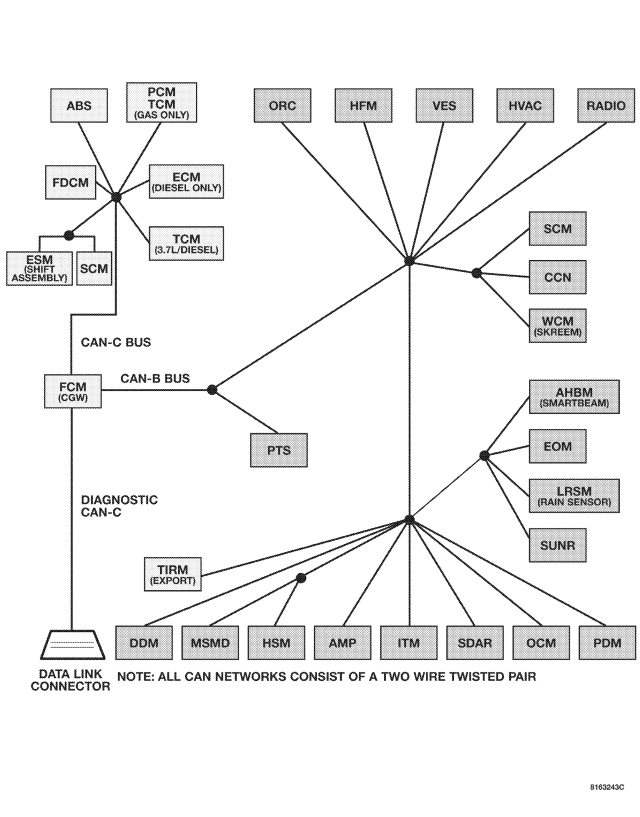
For a complete wiring diagram Refer to Section 8W.
- When Monitored:
With the ignition on.
Battery voltage between 10 and 16 volts.
IOD fuse installed.
FCM is configured correctly.
- Set Condition:
Bus messages not received from the Satellite Receiver (SDAR) for approximately 2 to 5 seconds.
| Possible Causes |
| CAN B BUS CIRCUITS OPEN OR SHORTED |
| DTCS RELATED TO BATTERY VOLTAGE, IGNITION, OR VIN MESSAGES |
| FCM NOT CONFIGURED CORRECTLY |
| SATELLITE RECEIVER POWER AND GROUND |
| SATELLITE RECEIVER |
| MODULE THAT SET THIS DTC |
Diagnostic Test
1.VERIFY DTC IS ACTIVENOTE: Ensure the IOD fuse is installed and battery voltage is between 10 and 16 volts before proceeding.
Is this DTC active?
Yes
- Go To 2
No
- Refer to the Stored Lost Communication test procedure. Refer to the table of contents in this section.
2.CHECK FOR ANY OF THE FOLLOWING ACTIVE DTCS
NOTE: Check for FCM configuration, CAN B or C hardware electrical, VIN Missing/Mismatch, battery or ignition related DTCs.
Does the scan tool display any active DTCs to the conditions listed above?
Yes
- Diagnose and repair the DTC. Refer to the Index for a complete list of the symptoms.
No
- Go To 3
3.VERIFY THAT THE SATELLITE RECEIVER IS ACTIVE ON THE BUS
Is the SDARS active on the bus?
Yes
- Go To 4
No
- Refer to the No Response test procedure. Refer to the table of contents in this section.
4.CHECK FOR ADDITIONAL COMMUNICATION RELATED DTCS
Is there more than one module with active DTCs “Logged Against” the SDARS?
Yes
- Replace/update the Satellite Receiver in accordance with the service information.
- Perform BODY VERIFICATION TEST – VER 1. (Refer to 8 - ELECTRICAL/ELECTRONIC CONTROL MODULES - STANDARD PROCEDURE).
No
- Replace/update the module that set the DTC in accordance with the service information
- Perform the appropriate VERIFICATION TEST.