P2299-BRAKE PEDAL POSITION / ACCELERATOR PEDAL POSITION INCOMPATIBLE
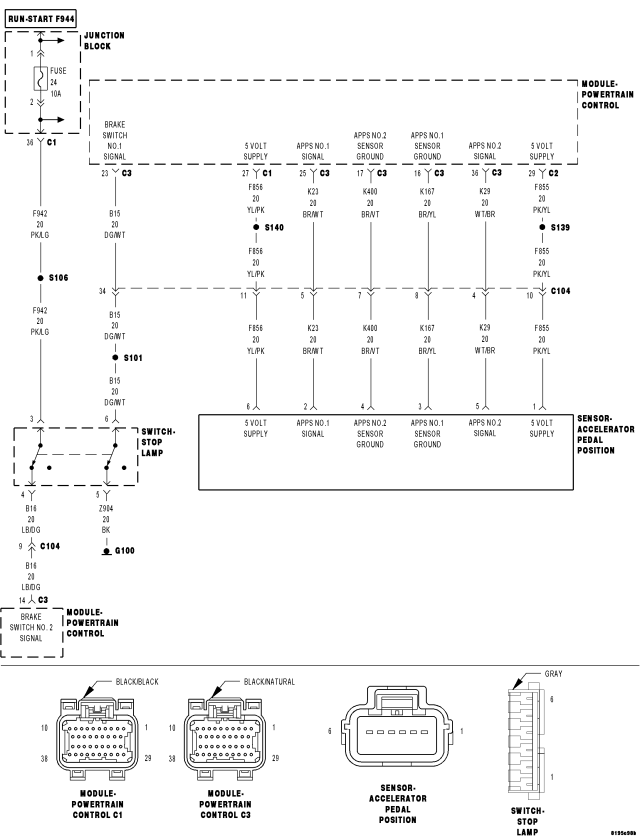
For a complete wiring diagram Refer to Section 8W.
- When Monitored:
Ignition on. No Break or APPS faults present.
- Set Condition:
The PCM recognizes a brake application following the APPS showing a fixed pedal opening. Temporary or permanent. Internally the PCM will reduce throttle opening below driver demand. One trip fault and the code will be set within 5 seconds. ETC light will illuminate, the light will only stay illuminated while DTC is active.
| Possible Causes |
| CUSTOMER PRESSING ACCELERATOR PEDAL, THEN PRESSING BRAKE PEDAL, AND CONTINUES HOLDING THEM DOWN SIMULTANEOUSLY |
| STOP LAMP SWITCH |
| APP SENSOR |
Always perform the Pre-Diagnostic Troubleshooting procedure before proceeding. (Refer to 9 - ENGINE - DIAGNOSIS AND TESTING).
Diagnostic Test
1.DTC INFORMATIONNOTE: If a pedal assembly becomes mechanically stuck the voltage output will stay fixed, if this is also Followed by a long application of the brakes this code will set.
NOTE: When this code sets the pedal position in the PCM software will ramp to idle. If the Pedal voltage changes OR the brake pedal is released, the pedal position in the PCM software will ramp up to the pedal position and the ETC light will go out.
NOTE: The most likely cause of this DTC is caused by the customer Brake Torquing the engine by pressing the Accelerator pedal and the pressing the Brake Pedal.
Are the listed conditions part of the customers driving habits?
Yes
- Advise the customer of what caused the DTC. This is normal operation of a ETC equipped vehicle because of safety issues.
- Perform the POWERTRAIN VERIFICATION TEST. (Refer to 9 - ENGINE - STANDARD PROCEDURE)
No
- Go To 2
2.STOP LAMP SWITCH OPERATION
Does the scan tool display the Pressed and Released while pressing and releasing the Pedal?
Yes
- Go To 3
No
- Check the Stop Lamp Switch for proper installation and check the related circuits for opens and shorts using the appropriate wiring diagram. If OK, replace the Stop Lamp Switch assembly.
- Perform the POWERTRAIN VERIFICATION TEST. (Refer to 9 - ENGINE - STANDARD PROCEDURE)
3.APP SENSOR SWEEP
Does the voltage for the appropriate sensor follow the list specification?
Yes
- Refer to the INTERMITTENT CONDITION Diagnostic Procedure.
- Perform the POWERTRAIN VERIFICATION TEST. (Refer to 9 - ENGINE - STANDARD PROCEDURE)
No
- Check the Signal and Return circuits for opens and shorts. If OK, Replace the APP Sensor Assembly per Service Information. After installation is complete, with a scan tool select the ETC RELEARN function to relearn the APPS values.
- Perform the POWERTRAIN VERIFICATION TEST. (Refer to 9 - ENGINE - STANDARD PROCEDURE)