PCM/ECM REPROGRAMMING
MODULE REPROGRAMING
Replacement PCM's will require programming utilizing the StarSCAN® or equivalent. The PCM will not operate the engine until it is programmed. A Diagnostic Trouble Code (DTC) will be set - “not programmed”.
CAUTION: Extreme care must be taken when programming a calibration into a generic PCM. Do not randomly select a calibration. Once a calibration is selected and programmed, the controller cannot be reprogrammed to a different calibration. The module can only be reprogrammed to a more recent version of that calibration.
SPECIAL TOOLS/EQUIPMENT OR EQUIVALENT REQUIRED:
| NPN | Battery Charger |
| CH9401 | StarSCAN® Tool |
| CH9404 | StarSCAN® Vehicle Cable |
| CH9409 | StarSCAN® Documentation Kit |
| CH9410 | StarSCAN® Ethernet Cable, 12 ft. |
| CH9412 | StarSCAN® Software Update Device Kit |
| TechCONNECT PC or equivalent | |
| StarSCAN® Software Update CD |
**REPAIR PROCEDURE - USING THE INTERNET TO RETRIEVE THE FLASH FILE:
NOTE: The StarSCAN® or equivalent diagnostic scan tool fully supports Internet connectivity. However, in order to take advantage of this feature you must first configure the StarSCAN® or equivalent for your dealership's network. For instruction on setting up your StarSCAN® or equivalent for the dealer's network; refer to the StarSCAN® or equivalent Quick Start Networking Guide available on DealerCONNECT > Service > StarSCAN® or equivalent and StarMOBILE Tools > Online Documentation or at www.dcctools.com website under the "download center".
NOTE: If this flash process is interrupted/aborted, the flash should be restarted.
STEP 9
STEP 10
STEP 11
STEP 13
STEP 12
NOTE: Due to the PCM programming procedure, a DTC may be set in other modules (TCM, BCM, MIC, SKREEM, etc.) within the vehicle, if so equipped. Some DTC's may cause the MIL to illuminate. From the “Home” screen select “System View”. Then select “All DTCs”. Press “Clear All Stored DTCs” if there are any DTCs shown on the list.
NOTE: The following step is required by law when reprogramming a PCM and/or TCM.
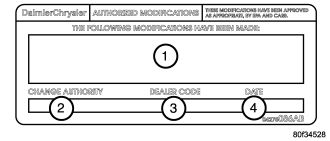
REPAIR PROCEDURE USING SOFTWARE UPDATE CD TO RETRIEVE THE FLASH FILE:
NOTE: If this flash process is interrupted/aborted, the flash should be restarted.
NOTE: For detailed information on the operation of the StarSCAN® or equivalent, refer to the Quick Reference documentation provided in the StarSCAN® or equivalent documentation kit. In addition, more recent information may also be available at the www.dcctools.com website. Look under "Training Aids" and also under "Download Center > Frequently Asked Questions" for more help.
Select a method for looking up controller flash updates.
STEP 4
STEP 8
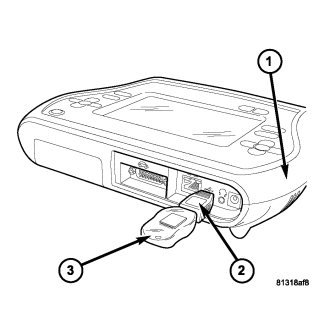
STEP 14
STEP 15
STEP 16
STEP 18
STEP 17
NOTE: Due to the PCM programming procedure, a DTC may be set in other modules (TCM, BCM, MIC, SKIM, etc.) within the vehicle, if so equipped. Some DTC's may cause the MIL to illuminate. Check all modules using “ECU View” from the Home screen, record the DTC's, and erase these DTC's prior to returning the vehicle to the customer. Erase any DTC's in the PCM only after all other modules have had their DTC's erased.
NOTE: The following step is required by law.