*NO RESPONSE FROM FCM (FRONT CONTROL MODULE)
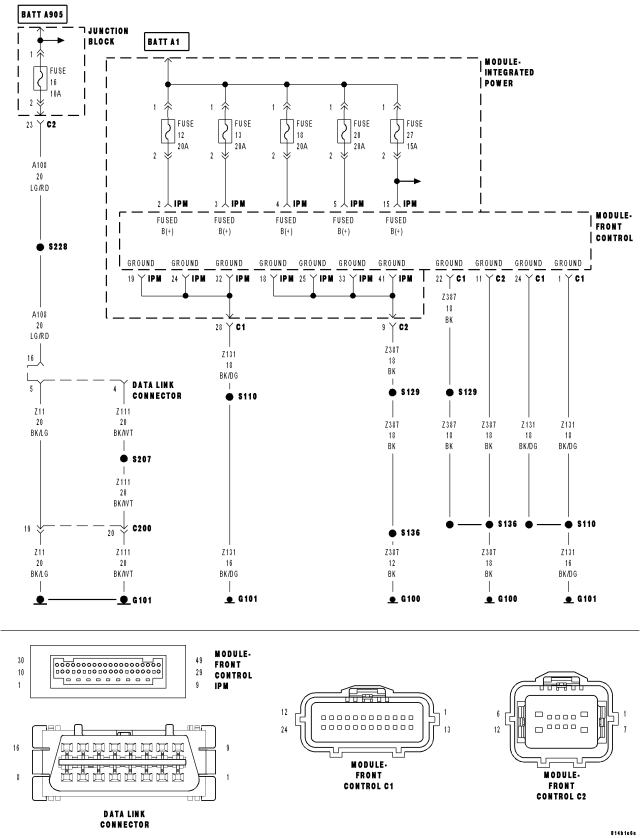
For a complete wiring diagram Refer to Section 8W.
| Possible Causes |
| (A108) FUSED B(+) CIRCUIT OPEN AT DLC |
| (Z11) (Z111) GROUND CIRCUIT OPEN AT DLC |
| GROUND CIRCUITS OPEN AT FCM |
| FUSED B(+) CIRCUITS OPEN AT FCM |
| FRONT CONTROL MODULE |
Diagnostic Test
1.TEST FOR INTERMITTENT CONDITIONNOTE: Ensure the IOD fuse is installed and battery voltage is between 10.0 and 16.0 volts.
NOTE: Ensure the scan tool is updated to the latest software.
NOTE: If the scan tool displays any error messages involving the CAN C Diagnostic circuits, diagnose and repair the error message before proceeding. Refer to the Table of Contents.
NOTE: A loss of communication with the FCM can cause the ECU View button on the scan tool to be inoperative (not highlighted).
Can the scan tool communicate with the FCM?
Yes
- The no response condition is not present at this time. Using the wiring diagram/schematic as a guide, inspect the wiring for chafed, pierced, pinched, and partially broken wires and the wiring harness connectors for broken, bent, pushed out, and corroded terminals.
No
- Go To 2
2.(A108) FUSED B(+) CIRCUIT OPEN AT DLC
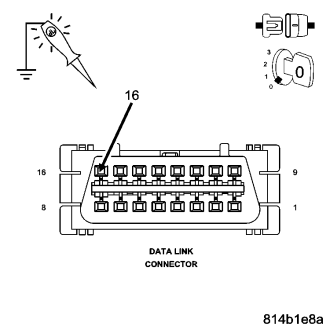
Does the test light illuminate brightly?
Yes
- Go To 3
No
- Repair the (A108) Fused B(+) circuit for an open or short.
- Perform BODY VERIFICATION TEST – VER 1. (Refer to 8 - ELECTRICAL/ELECTRONIC CONTROL MODULES - STANDARD PROCEDURE).
3.(Z11) (Z111) GROUND CIRCUIT OPEN AT DLC
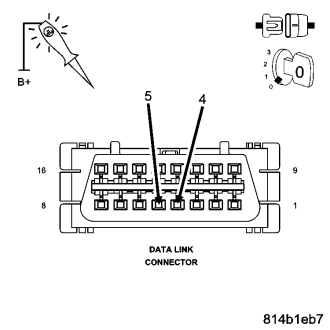
Does the test light illuminate brightly for each circuit?
Yes
- Go To 4
No
- Repair the ground circuit for an open.
- Perform BODY VERIFICATION TEST – VER 1. (Refer to 8 - ELECTRICAL/ELECTRONIC CONTROL MODULES - STANDARD PROCEDURE).
4.GROUND CIRCUITS OPEN AT FCM C1 CONNECTOR
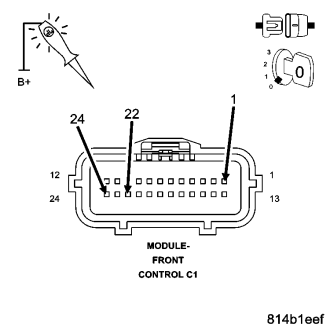
Does the test light illuminate brightly for each circuit?
Yes
- Go To 5
No
- Repair the ground circuit for an open. Inspect the connector for damage.
- Perform BODY VERIFICATION TEST – VER 1. (Refer to 8 - ELECTRICAL/ELECTRONIC CONTROL MODULES - STANDARD PROCEDURE).
5.GROUND CIRCUITS OPEN AT FCM IPM CONNECTOR
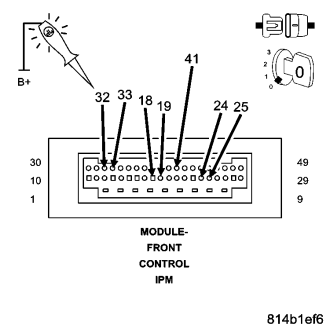
Does the test light illuminate brightly for each circuit?
Yes
- Go To 6
No
- Repair the ground circuit for an open. Inspect the connector for damage.
- Perform BODY VERIFICATION TEST – VER 1. (Refer to 8 - ELECTRICAL/ELECTRONIC CONTROL MODULES - STANDARD PROCEDURE).
6.FUSED B(+) CIRCUITS OPEN AT FCM IPM CONNECTOR

Does the test light illuminate brightly for each circuit?
Yes
- Replace and program the Front Control Module in accordance with the service information.
- Perform BODY VERIFICATION TEST – VER 1. (Refer to 8 - ELECTRICAL/ELECTRONIC CONTROL MODULES - STANDARD PROCEDURE).
No
- Repair the Fused B(+) circuit for an open. Inspect the connector for damage.
- Perform BODY VERIFICATION TEST – VER 1. (Refer to 8 - ELECTRICAL/ELECTRONIC CONTROL MODULES - STANDARD PROCEDURE).