U0197-LOST COMMUNICATION WITH HANDS FREE PHONE MODULE (HFM)
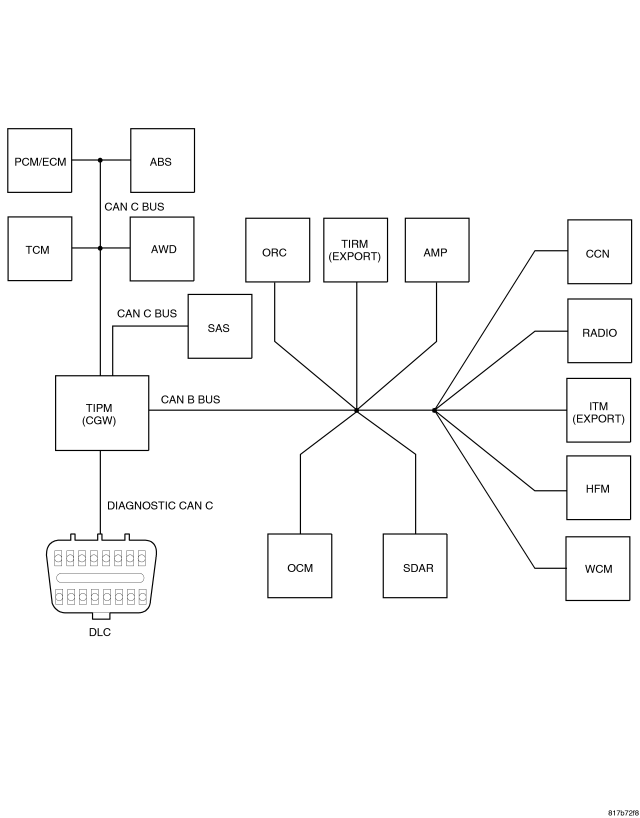
For a complete wiring diagram Refer to Section 8W.
- When Monitored:
With the ignition on.
Battery voltage between 10 and 16 volts.
IOD fuse installed.
TIPM is configured correctly.
- Set Condition:
Bus messages not received from the HFM for approximately 2 to 5 seconds.
| Possible Causes |
| CAN B BUS CIRCUITS OPEN OR SHORTED |
| DTC'S RELATED TO BATTERY VOLTAGE, IGNITION, OR VIN MESSAGES |
| TIPM NOT CONFIGURED CORRECTLY |
| HANDS FREE MODULE POWER AND GROUND |
| HANDS FREE MODULE |
| MODULE THAT SET THIS DTC |
Diagnostic Test
1.VERIFY DTC IS ACTIVENOTE: Ensure the IOD fuse is installed and battery voltage is between 10 and 16 volts before proceeding.
NOTE: Check for any TSB(s) related to the condition. If a TSB applies, perform the procedure outlined in the TSB before continuing.
Is this DTC active?
Yes
- Go To 2
No
- Perform the Stored Lost Communication test procedure. (Refer to 8 - ELECTRICAL/ELECTRONIC CONTROL MODULES - DIAGNOSIS AND TESTING).
2.CHECK FOR ANY OF THE FOLLOWING ACTIVE DTC'S
NOTE: Check for TIPM configuration, CAN B or C hardware electrical, VIN Missing/Mismatch, battery or ignition related DTC's.
Does the scan tool display any active DTC's to the conditions listed above?
Yes
- Diagnose and repair the DTC. Refer to the Table of Contents for a complete list of the symptoms.
No
- Go To 3
3.VERIFY THAT THE HFM IS ACTIVE ON THE BUS
Is the HFM active on the bus?
Yes
- Go To 4
No
- Perform the appropriate No Response diagnostic procedure. (Refer to 8 - ELECTRICAL/ELECTRONIC CONTROL MODULES - DIAGNOSIS AND TESTING).
4.CHECK FOR ADDITIONAL COMMUNICATION RELATED DTC'S
Is there more than one module with active DTC's “Logged Against” the HFM?
Yes
- Replace/update the Hands Free Module in accordance with the service information.
- Perform the BODY VERIFICATION TEST – VER 1. (Refer to 8 - ELECTRICAL/ELECTRONIC CONTROL MODULES - STANDARD PROCEDURE).
No
- Replace/update the module that set this DTC in accordance with the service information.
- Perform the appropriate VERIFICATION TEST.