B1BA8-OCM SYSTEM OUT OF CALIBRATION/NOT CALIBRATED
- When Monitored:
While the CAN bus ignition status is IGN_RUN or signal not available.
- Set Condition:
This DTC will set if the module has initiated a re-zero and did not successfully complete the system verification, a system verification routine has been aborted or a update option table from flash routine has been completed.
Diagnostic Test
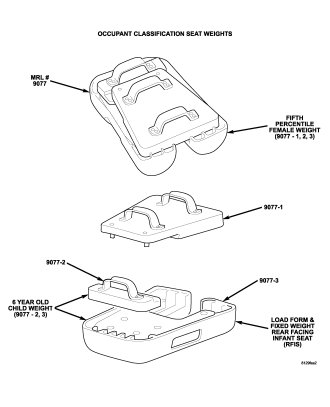
1.PERFORM OCCUPANT CLASSIFICATION MODULE SYSTEM VERIFICATION TESTNOTE: Failure to follow the test instructions or aborting the test will cause faults to set when performing the Occupant Classification Module System Verification Test. To prevent faults due to process errors: verify that all tests steps that led you here were performed as directed; verify that the ignition is in run; Wait 30 seconds after changing the seat weight before proceeding to allow the system to stabilize; only press scan tool buttons when directed to do so; and perform the Occupant Classification Module System Verification Test to completion.
Does the scan tool display any active DTCs?
Yes
- Go To 2
Yes
- But Other DTCs Present?
- Diagnose and repair the DTCs. Refer to the Table of Contents in this Section for a complete list of symptoms.
No
- No Active DTCs Present?
- Perform *OCM SYSTEM VERIFICATION TEST.
Diagnostic Test
2.PERFORM SENSOR TORQUE TESTWARNING: To avoid personal injury or death, turn the ignition off, disconnect the battery and wait two minutes before proceeding.
WARNING: To avoid personal injury or death, turn the ignition off, disconnect the battery and wait two minutes before proceeding.
WARNING: To avoid personal injury or death, turn the ignition on, then reconnect the battery.
NOTE: Failure to follow the test instructions or aborting the test will cause faults to set when performing the Occupant Classification Module System Verification Test. To prevent faults due to process errors: verify that all tests steps that led you here were performed as directed; verify that the ignition is in run; Wait 30 seconds after changing the seat weight before proceeding to allow the system to stabilize; only press scan tool buttons when directed to do so; and perform the Occupant Classification Module System Verification Test to completion.
Does the scan tool display any active DTCs?
Yes
- Perform the *Diagnosis/Checkout Procedure For Seat Weight Sensors.
Yes
- But Other DTCs Present?
- Diagnose and repair the DTCs. Refer to the Table of Contents in this Section for a complete list of symptoms.
No
- No Active DTCs Present?
- Perform *OCM SYSTEM VERIFICATION TEST.