*BELT TENSION SENSOR VERIFICATION TEST
For a complete wiring diagram Refer to Section 8W.
Diagnostic Test
1.CHECK THE PASSENGER BELT TENSION SENSOR OUTPUT WITH NO LOAD APPLIED TO THE SENSORNOTE: Ensure that the battery is fully charged.
WARNING: To avoid personal injury or death, turn the ignition on, then reconnect the battery.
Is the Passenger BTS Output between 39 and 69?
Yes
- Go To 2
No
- Replace the Front Passenger Seat Belt Retractor and Passenger Belt Tension Sensor Assembly in accordance with the Service Information.
- Perform *OCS VERIFICATION TEST - VER 1.
2.CHECK THE PASSENGER BELT TENSION SENSOR OUTPUT WITH A LOAD APPLIED TO THE SENSOR
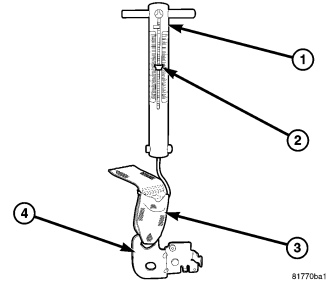
- Connect the hook at the bottom of the spring scale through the Passenger Belt Tension Sensor (4) webbing loop (3) so that the end of the hook faces the passenger seat.
- Place the maximum reading indicator (2) at the bottom of the spring scale.
- Grab the horizontal bar at the top of the spring scale (1). Pull the spring scale straight upward keeping the horizontal bar level with the door sill and the spring scale in-line with the Passenger Belt Tension Sensor.
- Apply and hold 11 kg (24 lbs) to 12 kg (26 lbs) of pressure on the sensor while an assistant monitors the Passenger Belt Tension Sensor Output on the scan tool display.
Is the Passenger BTS Output between 153 and 204 with 11 kg (24 lbs) to 12 kg (26 lbs) of pressure applied to the sensor?
Yes
- Maintain the 11 kg (24 lbs) to 12 kg (26 lbs) of pressure on the Passenger Belt Tension Sensor and Go To 3
No
- Replace the Front Passenger Seat Belt Retractor and Passenger Belt Tension Sensor Assembly in accordance with the Service Information.
- Perform *OCS VERIFICATION TEST - VER 1.
3.CHECK THE PASSENGER BELT TENSION SENSOR OUTPUT WITH THE LOAD RELEASED
Does the Passenger BTS Output return to between 39 and 69 within 20 seconds of releasing the load?
Yes
- Perform *OCS VERIFICATION TEST - VER 1.
No
- Replace the Front Passenger Seat Belt Retractor and Passenger Belt Tension Sensor Assembly in accordance with the Service Information.
- Perform *OCS VERIFICATION TEST - VER 1.