P2299- BRAKE PEDAL POSITION/ACCELERATOR PEDAL POSITION INCOMPATIBLE
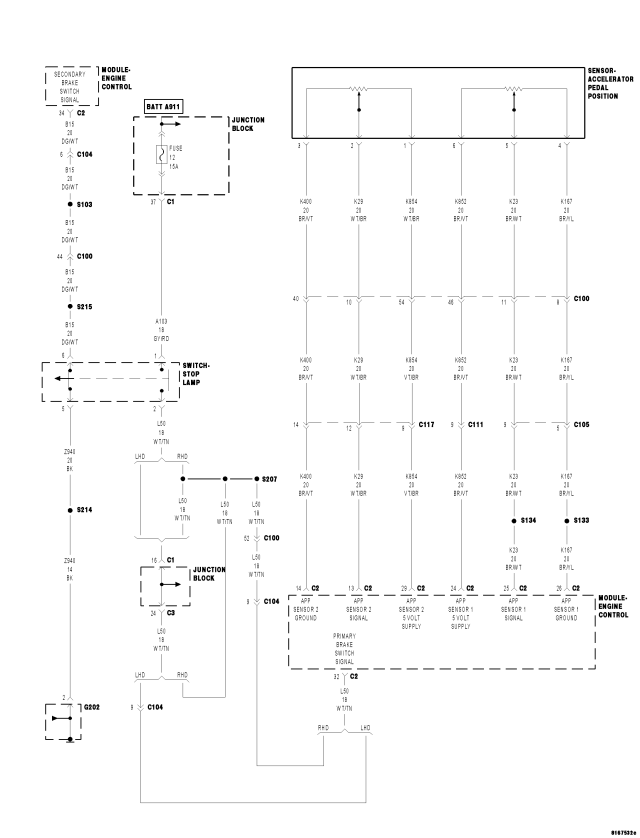
For a complete wiring diagram Refer to Section 8W.
- When Monitored:
With the engine running (engine speed above 570 rpm). No other APP or Brake Signal DTC's. Vehicle speed above 3 km/h.
- Set Condition:
The ECM detects a brake signal input (brakes applied) and Accelerator Pedal Position above 3% at the same time for 15.0 seconds.
| Possible Causes |
| ACCELERATOR PEDAL POSITION SENSOR |
| ACCELERATOR PEDAL OBSTRUCTION |
| BRAKE SWITCH ADJUSTMENT |
| BRAKE SWITCH |
| INTERMITTENT WIRING/CONNECTOR PROBLEM |
Always perform the Pre-Diagnostic Troubleshooting procedure before proceeding. (Refer to 9 - ENGINE - DIAGNOSIS AND TESTING)
Diagnostic Test
1.CHECK FOR ACTIVE DTCNOTE: This DTC may be set if the vehicle operator is “riding” the brake pedal (driving with both feet).
Does the scan tool display this DTC?
Yes
- Go To 2
No
- Refer to the *CHECKING FOR AN INTERMITTENT DTC Diagnostic Procedure. (Refer to 9 - ENGINE - DIAGNOSIS AND TESTING)
2.CHECK BRAKE SWITCH OPERATION
NOTE: This DTC may be set if the Brake Switch is not properly adjusted. Check Brake Switch adjustment before continuing.
Are the Primary and Secondary Brake Switch inputs operating properly?
Yes
- Go To 3
No
- Refer to the Service Information Wiring to diagnose Brake Switch and/or Brake Switch wiring problem.
- Perform the ECM Verification Test Ver. 1. (Refer to 9 - ENGINE - DIAGNOSIS AND TESTING)
3.CHECK ACCELERATOR PEDAL MOVEMENT
Were any of these problems found?
Yes
- Repair or replace as necessary.
- Perform the ECM Verification Test Ver. 1. (Refer to 9 - ENGINE - DIAGNOSIS AND TESTING)
No
- Go To 4
4.CHECK ACCELERATOR PEDAL POSITION SENSOR INPUT
NOTE: The Accelerator Pedal must be at the complete rest position for this test. Ensure the pedal is at rest and free from any obstruction.
Does the scan tool display below 2% for APP #1 and APP #2 percentages?
Yes
- Go To 5
No
- Replace the Accelerator Pedal Position Sensor.
- Perform the ECM Verification Test Ver. 1. (Refer to 9 - ENGINE - DIAGNOSIS AND TESTING)
5.INTERMITTENT APP SENSOR/BRAKE SWITCH
Were any problems found with the inputs during pedal actuation for the Brakes or Accelerator?
Yes
- Repair or replace as necessary.
No
- Using the wiring diagrams check the connectors and wiring associated with the Accelerator Pedal Sensor and Brake Switch for damage, corrosion or other problems that could cause an intermittent DTC.