ITM–NO SERIAL COMMUNICATION (EXPORT ONLY)
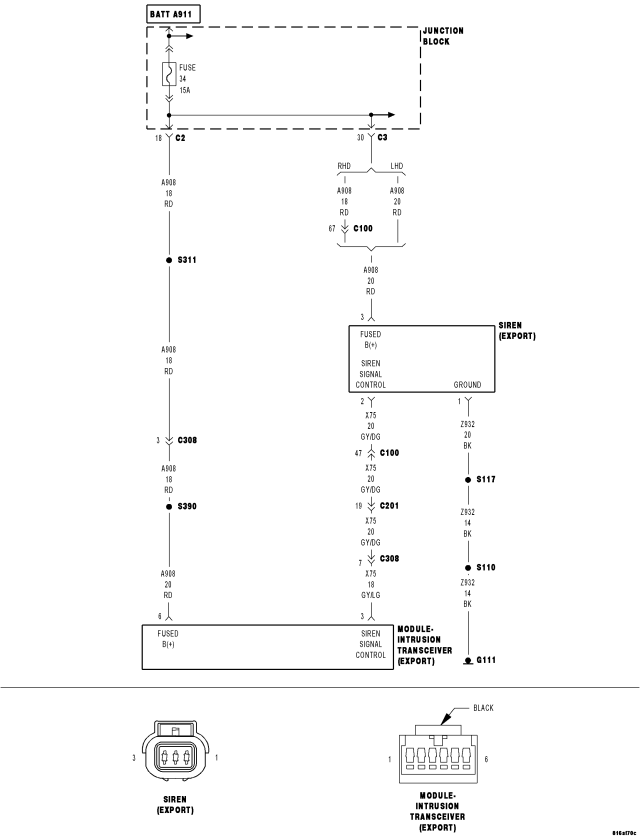
For a complete wiring diagram Refer to Section 8W
- When Monitored:
Continuously while the VTSS is armed.
- Set Condition:
If the Intrusion Transceiver Module (ITM) fails to receive messages from the Siren.
| Possible Causes |
| (A908) FUSED B+ CIRCUIT OPEN |
| (Z932) GROUND CIRCUIT OPEN |
| (X75) SIREN SIGNAL CONTROL CIRCUIT SHORTED TO GROUND |
| (X75) SIREN SIGNAL CONTROL CIRCUIT OPEN |
| VTSS SIREN |
| INTRUSION TRANSCEIVER MODULE (ITM) |
Diagnostic Test
1.VERIFY THAT THE DTC IS ACTIVEDid this DTC reset?
Yes
- Go To 2
No
- The condition that caused this symptom is currently not present. Inspect the related wiring harness for a possible intermittent condition. Look for any chafed, pierced or partially broken wires.
- Perform BODY VERIFICATION TEST - VER 1. (Refer to 8 - ELECTRICAL/ELECTRONIC CONTROL MODULES - STANDARD PROCEDURE).
2.CHECK THE (A908) FUSED B+ CIRCUIT FOR AN OPEN
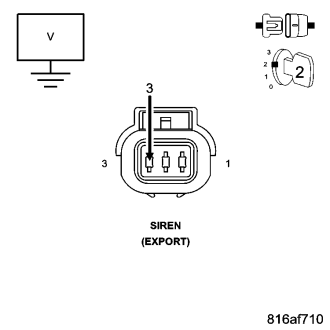
Is the voltage above 10.0 volts?
Yes
- Go To 3
No
- Repair the (A908) Fused B+ circuit for an open.
- Perform VTSS VERIFICATION TEST - 1A. (Refer to VTSS VERIFICATION TEST - 1A - STANDARD PROCEDURE) in this Section.
3.CHECK THE (Z932) GROUND CIRCUIT FOR AN OPEN
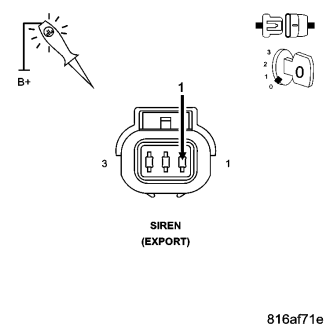
Does the test light illuminate brightly?
Yes
- Go To 4
No
- Repair the (Z932) Ground circuit for an open.
- Perform VTSS VERIFICATION TEST - 1A. (Refer to VTSS VERIFICATION TEST - 1A - STANDARD PROCEDURE) in this Section.
4.CHECK THE (X75) SIREN SIGNAL CONTROL CIRCUIT FUNCTION
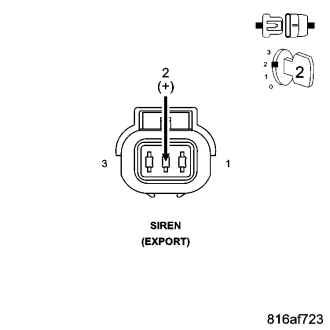
- Turn the ignition on.
- Use the Scope input cable CH7058, Cable to Probe adapter CH7062 and the red and black test probes.
- Connect the scope input cable to the channel one connector on the DRBIII®.
- Attach the red and black leads and the cable to probe adapter to the scope input cable.
- Select DRBIII® Standalone.
- Select lab scope.
- Select Live.
- Select 12 volt square wave.
- Press F2 for Scope.
- Press F2 and use the down arrow to set voltage range to 20 volts. Press F2 again when complete.
Is there a voltage square wave present for one to two seconds?
Yes
- Replace the VTSS Siren in accordance with the Service Information.
- Perform BODY VERIFICATION TEST - VER 1. (Refer to 8 - ELECTRICAL/ELECTRONIC CONTROL MODULES - STANDARD PROCEDURE).
No
- Go To 5
5.CHECK THE (X75) SIREN SIGNAL CONTROL CIRCUIT FOR A SHORT TO GROUND
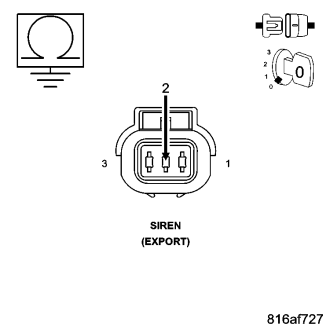
Is the resistance below 100.0 ohms?
Yes
- Repair the (X75) Siren Signal Control circuit for a short to ground.
- Perform VTSS VERIFICATION TEST - 1A. (Refer to VTSS VERIFICATION TEST - 1A - STANDARD PROCEDURE) in this Section.
No
- Go To 6
6.CHECK THE (X75) SIREN SIGNAL CONTROL CIRCUIT FOR AN OPEN
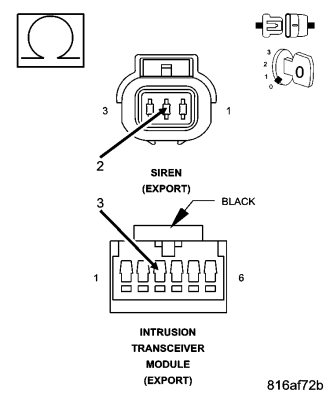
Is the resistance below 5.0 ohms?
Yes
- Replace the ITM in accordance with the Service Information.
- Perform BODY VERIFICATION TEST - VER 1. (Refer to 8 - ELECTRICAL/ELECTRONIC CONTROL MODULES - STANDARD PROCEDURE).
No
- Repair the (X75) Siren Signal Control circuit for an open.
- Perform VTSS VERIFICATION TEST - 1A. (Refer to VTSS VERIFICATION TEST - 1A - STANDARD PROCEDURE) in this Section.